
XD Lands on iPhone (Beta)XD Lands di iPhone (Beta)
The full game on your iPhone, installed from a computer with your own Apple ID. No App Store.Game lengkapnya di iPhone-mu, dipasang dari komputer dengan Apple ID-mu sendiri. Tanpa App Store.
Pick your wayPilih caramu
Have a Windows PC?Punya PC Windows? The easiest: one program installs everything. Once a week, plug in the iPhone and press Refresh.Paling mudah: satu program memasang semuanya. Seminggu sekali, sambungkan iPhone lalu tekan Segarkan.
Install with XD Lands SetupPasang dengan XD Lands Setup
On a Windows 10 or 11 PC, download XD Lands Setup and open it. If Windows says it protected your PC, click More info, then Run anyway, and allow it to make changes.Di PC Windows 10 atau 11, unduh XD Lands Setup lalu buka. Kalau Windows bilang telah melindungi PC-mu, klik More info lalu Run anyway, dan izinkan aplikasinya membuat perubahan.
Download XD Lands SetupUnduh XD Lands SetupWindows 10 or 11, 64-bit. About 20 MB.Windows 10 atau 11, 64-bit. Sekitar 20 MB.
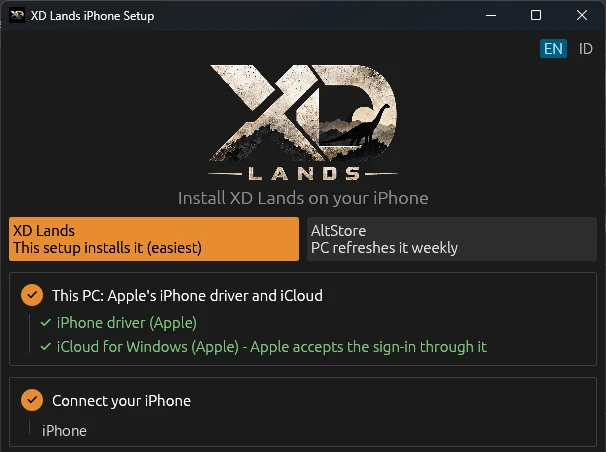
XD Lands Setup on the PC.XD Lands Setup di PC. Connect your iPhone with a cable, unlock it and tap Trust. The Setup installs Apple's iPhone driver and iCloud for Windows by itself (about 360 MB from Apple).Sambungkan iPhone dengan kabel, buka kuncinya, lalu ketuk Percayai. Setup memasang driver iPhone dan iCloud untuk Windows dari Apple dengan sendirinya (sekitar 360 MB dari Apple).
Sign in with your Apple ID in the Setup and press Install XD Lands. If Apple sends you a code, type it in. Your Apple ID goes only to Apple, never to us.Masuk dengan Apple ID-mu di Setup lalu tekan Pasang XD Lands. Kalau Apple mengirim kode, ketikkan kodenya. Apple ID-mu hanya dikirim ke Apple, tidak pernah ke kami.
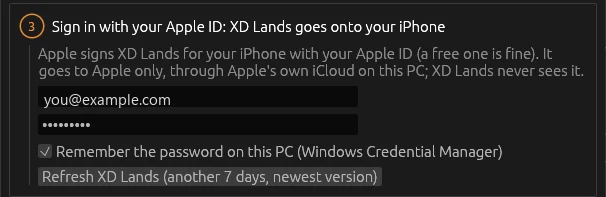
Installing XD Lands from the PC.Memasang XD Lands dari PC. On the iPhone, open Settings > General > VPN & Device Management and trust your Apple ID. On iOS 16 or later, also turn on Settings > Privacy & Security > Developer Mode; the iPhone restarts once.Di iPhone, buka Pengaturan > Umum > VPN & Manajemen Perangkat dan percayai Apple ID-mu. Di iOS 16 atau lebih baru, nyalakan juga Pengaturan > Privasi & Keamanan > Mode Pengembang; iPhone akan mulai ulang sekali.
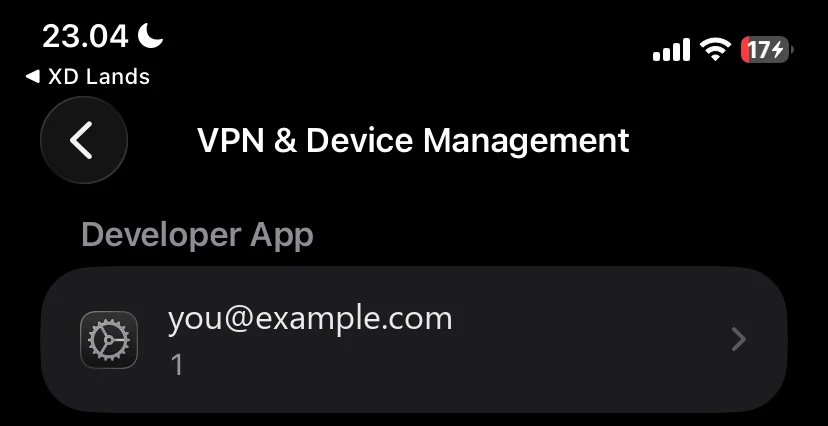
Trusting your Apple ID in Settings.Memercayai Apple ID-mu di Pengaturan. Open XD Lands and sign in with Discord: in the Discord app if you have it, otherwise in Safari. Then come back to the game.Buka XD Lands dan masuk dengan Discord: lewat aplikasi Discord kalau ada, kalau tidak lewat Safari. Lalu kembali ke game.
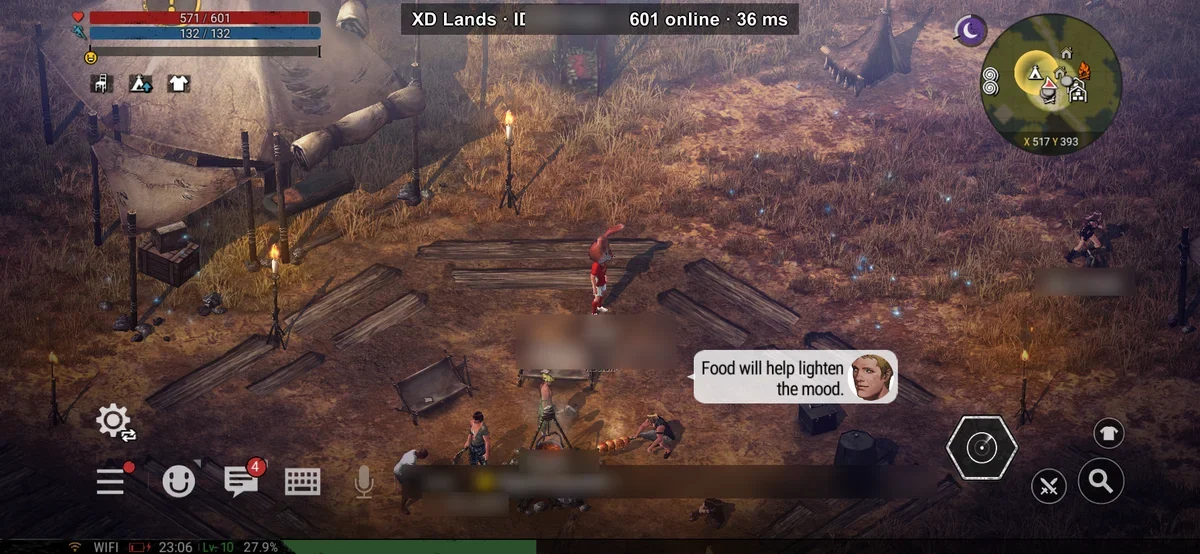
XD Lands running on the iPhone.XD Lands berjalan di iPhone.
Have a Mac?Punya Mac? Works on Windows too. Your computer stays on the same Wi-Fi to refresh the app every week.Bisa juga di Windows. Komputermu tetap di Wi-Fi yang sama untuk menyegarkan aplikasinya setiap minggu.
Install with AltStorePasang dengan AltStore
On your PC, install iTunes and iCloud from Apple's website, not the Microsoft Store (AltStore's guide has the links). Then install AltServer and run it as administrator. On a Mac, you only need AltServer.Di PC, pasang iTunes dan iCloud dari situs Apple, bukan dari Microsoft Store (tautannya ada di panduan AltStore). Lalu pasang AltServer dan jalankan sebagai administrator. Di Mac, cukup AltServer.
Connect your iPhone with a cable, unlock it and tap Trust. On Windows, open iTunes, sign in and turn on Wi-Fi sync for your iPhone (that is what lets AltStore refresh the app later). Then click the AltServer icon (in the tray on Windows, the menu bar on a Mac), choose Install AltStore, pick your iPhone and sign in with your Apple ID.Sambungkan iPhone dengan kabel, buka kuncinya, lalu ketuk Percayai. Di Windows, buka iTunes, masuk, dan nyalakan sinkronisasi Wi-Fi untuk iPhone-mu (inilah yang nanti membuat AltStore bisa menyegarkan aplikasinya). Lalu klik ikon AltServer (di tray pada Windows, di menu bar pada Mac), pilih Install AltStore, pilih iPhone-mu, lalu masuk dengan Apple ID-mu.
On the iPhone, open Settings > General > VPN & Device Management and trust your Apple ID. On iOS 16 or later, also turn on Settings > Privacy & Security > Developer Mode; the iPhone restarts once.Di iPhone, buka Pengaturan > Umum > VPN & Manajemen Perangkat dan percayai Apple ID-mu. Di iOS 16 atau lebih baru, nyalakan juga Pengaturan > Privasi & Keamanan > Mode Pengembang; iPhone akan mulai ulang sekali.
Open AltStore and add the XD Lands source.Buka AltStore dan tambahkan sumber XD Lands.
Add to AltStoreTambah ke AltStoreOr copy the source address:Atau salin alamat sumbernya:
https://xdlands.com/ios/source.jsonOpen the XD Lands source and tap Free to install. Keep the computer on the same Wi-Fi with AltServer running, so AltStore can refresh the app.Buka sumber XD Lands dan ketuk Free untuk memasang. Biarkan komputer tetap di Wi-Fi yang sama dengan AltServer berjalan, agar AltStore bisa menyegarkan aplikasinya.
Or download the IPA and open it with AltStore.Atau unduh IPA-nya dan buka dengan AltStore.
Open XD Lands and sign in with Discord: in the Discord app if you have it, otherwise in Safari. Then come back to the game.Buka XD Lands dan masuk dengan Discord: lewat aplikasi Discord kalau ada, kalau tidak lewat Safari. Lalu kembali ke game.
No computer of your own?Tidak punya komputer sendiri? You borrow a computer once to set it up. After that, everything happens on the iPhone.Kamu cukup meminjam komputer sekali untuk menyiapkannya. Setelah itu, semuanya di iPhone.
Paused for now: since 12 October Apple refuses SideStore's sign-in (error -80045). Until that is fixed, use XD Lands Setup or AltStore.Sementara dihentikan: sejak 12 Oktober Apple menolak proses masuk SideStore (error -80045). Sampai itu diperbaiki, pakai XD Lands Setup atau AltStore.
Install with SideStorePasang dengan SideStore
Set up SideStore once with a computer, following SideStore's own guide. A Windows PC, Mac or Linux computer works; a friend's is fine. The guide also covers trusting the app and Developer Mode.Siapkan SideStore sekali dengan komputer, mengikuti panduan SideStore sendiri. PC Windows, Mac, atau Linux bisa; punya teman juga boleh. Panduannya juga membahas cara memercayai aplikasi dan Mode Pengembang.
Open SideStore and add the XD Lands source.Buka SideStore dan tambahkan sumber XD Lands.
Add to SideStoreTambah ke SideStoreOr copy the source address:Atau salin alamat sumbernya:
https://xdlands.com/ios/source.jsonOpen the XD Lands source and tap Free to install. SideStore refreshes it on the iPhone, no computer needed.Buka sumber XD Lands dan ketuk Free untuk memasang. SideStore menyegarkannya langsung di iPhone, tanpa komputer.
Or download the IPA and open it with SideStore.Atau unduh IPA-nya dan buka dengan SideStore.
Open XD Lands and sign in with Discord: in the Discord app if you have it, otherwise in Safari. Then come back to the game.Buka XD Lands dan masuk dengan Discord: lewat aplikasi Discord kalau ada, kalau tidak lewat Safari. Lalu kembali ke game.
If something failsKalau gagal
- Bonjour64.msi: msiexec 1603Download the Setup again (1.0.3 or later); it skips a failed Bonjour. Or remove Bonjour in Settings > Apps, restart the PC and open the Setup again.Unduh ulang Setup (1.0.3 atau lebih baru); Bonjour yang gagal dilewati. Atau hapus Bonjour di Settings > Apps, restart PC, lalu buka Setup lagi.
- Auth error -20101Apple says the email or password is wrong. Type your Apple ID password, not the iPhone passcode; you can check it at account.apple.com.Apple menganggap email atau kata sandinya salah. Ketik kata sandi Apple ID, bukan kode buka iPhone; bisa dicek di account.apple.com.
- Auth error -22411This Apple ID has never been signed in on an iPhone or iPad. Sign in with it on your iPhone, accept the terms at developer.apple.com/account, wait about 30 minutes and try again.Apple ID ini belum pernah login di iPhone atau iPad. Login dengan Apple ID itu di iPhone, setujui persyaratan di developer.apple.com/account, tunggu sekitar 30 menit, lalu coba lagi.
- XD Lands does not open (Untrusted Developer)XD Lands tidak mau terbuka (Untrusted Developer)Settings > General > VPN & Device Management: trust your Apple ID. On iOS 16 or later, also turn on Developer Mode in Settings > Privacy & Security.Pengaturan > Umum > VPN & Manajemen Perangkat: percayai Apple ID-mu. Di iOS 16 ke atas, nyalakan juga Mode Pengembang di Pengaturan > Privasi & Keamanan.
- Discord does not bring you back to the gameDiscord tidak mengembalikanmu ke gameTap Authorize and wait; don't switch back yourself. Installed with TrollStore? In TrollStore, tap Settings > Refresh App Registrations.Ketuk Authorize lalu tunggu; jangan kembali ke game sendiri. Pasang lewat TrollStore? Di TrollStore, ketuk Settings > Refresh App Registrations.
- XD Lands stopped opening after a weekXD Lands tidak bisa dibuka setelah semingguThe free Apple ID's 7 days are up. Plug the iPhone in and press Refresh in the Setup; your progress is kept.Masa 7 hari Apple ID gratis sudah habis. Sambungkan iPhone lalu tekan Segarkan di Setup; progresmu tetap aman.
Good to knowPerlu diketahui
- With a free Apple ID the app needs a refresh every 7 days. With XD Lands Setup, plug in the iPhone once a week and press Refresh; AltStore or SideStore does it for you. Your progress is always kept.Dengan Apple ID gratis, aplikasinya perlu disegarkan setiap 7 hari. Dengan XD Lands Setup, sambungkan iPhone seminggu sekali lalu tekan Segarkan; AltStore atau SideStore melakukannya untukmu. Progresmu selalu tersimpan.
- A free Apple ID can hold at most 3 sideloaded apps at once. AltStore or SideStore counts as one of them.Satu Apple ID gratis bisa memuat paling banyak 3 aplikasi sideload sekaligus. AltStore atau SideStore termasuk salah satunya.
- Updates: Refresh in XD Lands Setup always installs the newest version. On AltStore or SideStore, they appear in the source.Update: Segarkan di XD Lands Setup selalu memasang versi terbaru. Di AltStore atau SideStore, update muncul di sumbernya.
- Voice chat works on iPhone too. Allow the microphone when the game asks.Voice chat juga berfungsi di iPhone. Izinkan mikrofon saat game memintanya.
Signing it yourselfTanda tangan sendiri
Have your own certificate, or TrollStore? Download the unsigned IPA and sign or install it with ESign, Feather, Sideloadly or TrollStore. Discord sign-in still works under another bundle ID.Punya sertifikat sendiri atau TrollStore? Unduh IPA tanpa tanda tangan ini, lalu tanda tangani atau pasang dengan ESign, Feather, Sideloadly, atau TrollStore. Login Discord tetap jalan meski bundle ID-nya diganti.
Or add this source in Feather or AltStore; it always lists the newest build:Atau tambahkan sumber ini di Feather atau AltStore; isinya selalu build terbaru:
https://xdlands.com/ios/source.json